
Python hosting
Affordable Python Hosting for Less Than $3/Month with Database and Redis
Deploy Django, Flask, Pyramid, and WSGI apps with Python runtimes, MariaDB databases, Redis, SSL, Git, SSH, SFTP, backups, email, and Passenger.
Published 2026-07-30 · 12 min read
Python hosting is easiest when the application, files, dependencies, and process model are treated as separate pieces. On HostRight, HostRight Control Panel creates the Python application and Phusion Passenger serves its WSGI entry point. You transfer the code, install dependencies, configure the environment, then reload the app when you release a change.
This gives Django, Flask, Pyramid, Bottle, and custom WSGI projects a managed home without requiring a VPS, systemd service, reverse proxy, or process supervisor.
The deployment model
A HostRight Python application has five important values:
| Setting | Example | Purpose |
|---|---|---|
| Python version | 3.12 | Selects the runtime |
| Application root | apps/example-app | Private project directory |
| Application URL | example.com | Public address |
| Startup file | passenger_wsgi.py | File Passenger imports |
| Entry point | application | WSGI callable Passenger serves |
Keep project code in a private account folder, not in the domain's public_html directory.
Why keep Python files private?
A private application directory keeps source code, virtual environments, .env files, database credentials, Git metadata, SSH keys, logs, and dependency caches away from direct browser access.
apps/example-app/
├── app.py
├── passenger_wsgi.py
├── requirements.txt
├── src/
├── templates/
└── static/
For Django:
apps/example-django/
├── manage.py
├── passenger_wsgi.py
├── requirements.txt
├── project/
│   ├── settings.py
│   └── wsgi.py
└── staticfiles/
Transfer with Git, SFTP, or FTP
Git is best for repeatable releases:
mkdir -p ~/apps
cd ~/apps
git clone git@github.com:example/example-app.git example-app
cd example-app
git pull --ff-only origin main
SFTP is preferred when you build locally:
sftp -i ~/.ssh/id_ed25519 USERNAME@SERVER_HOSTNAME
Inside SFTP:
cd apps/example-app
put -r .
bye
Use Deploy files with SFTP for the complete setup. FTP is also available when an existing workflow requires it, but it only transfers files. It does not install packages, set variables, run migrations, or reload Passenger. See Deploy website files with FTP.
Create the application in HostRight Control Panel
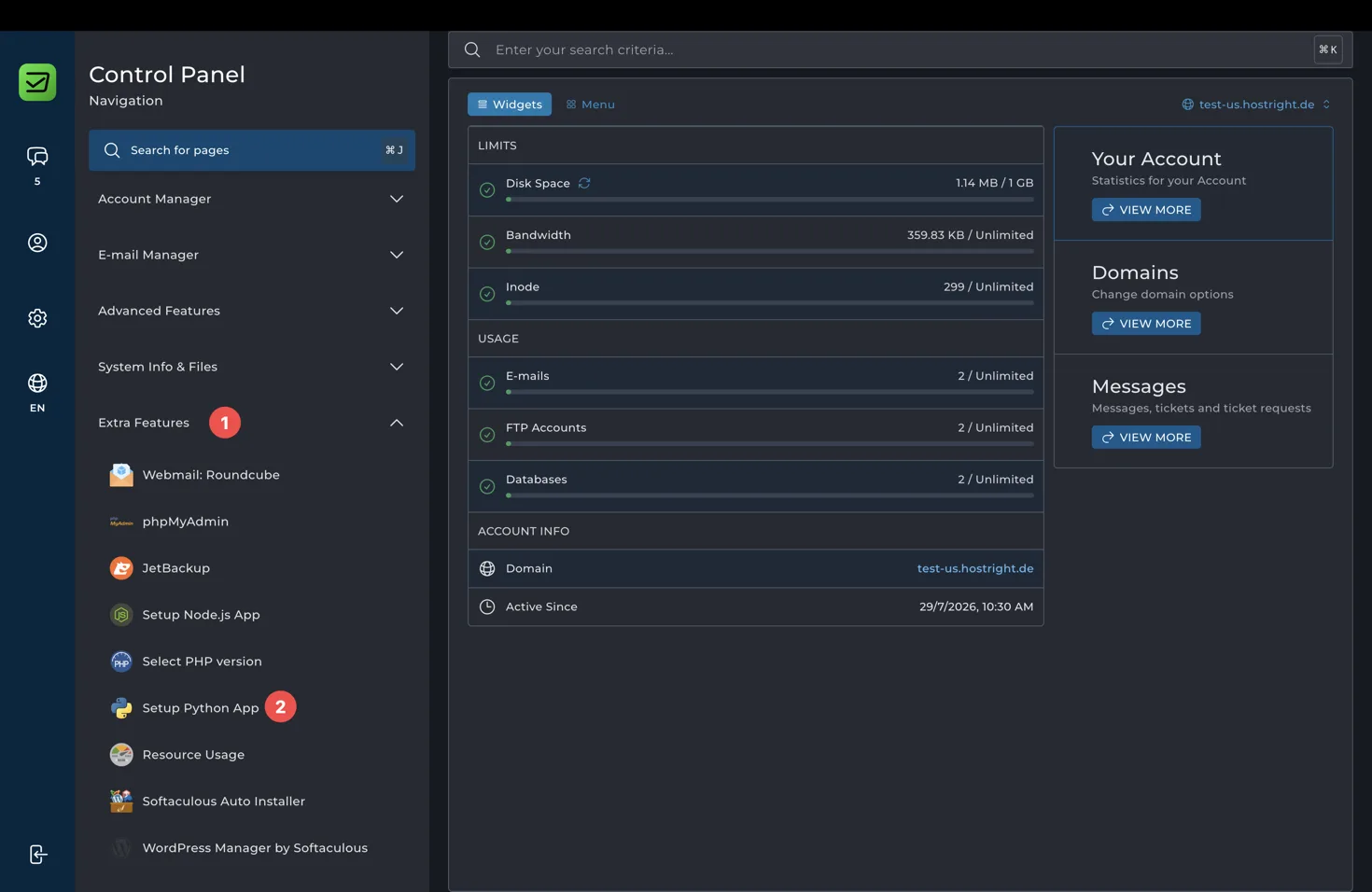
Open Extra Features → Setup Python App, select Create Application, and fill in the form.
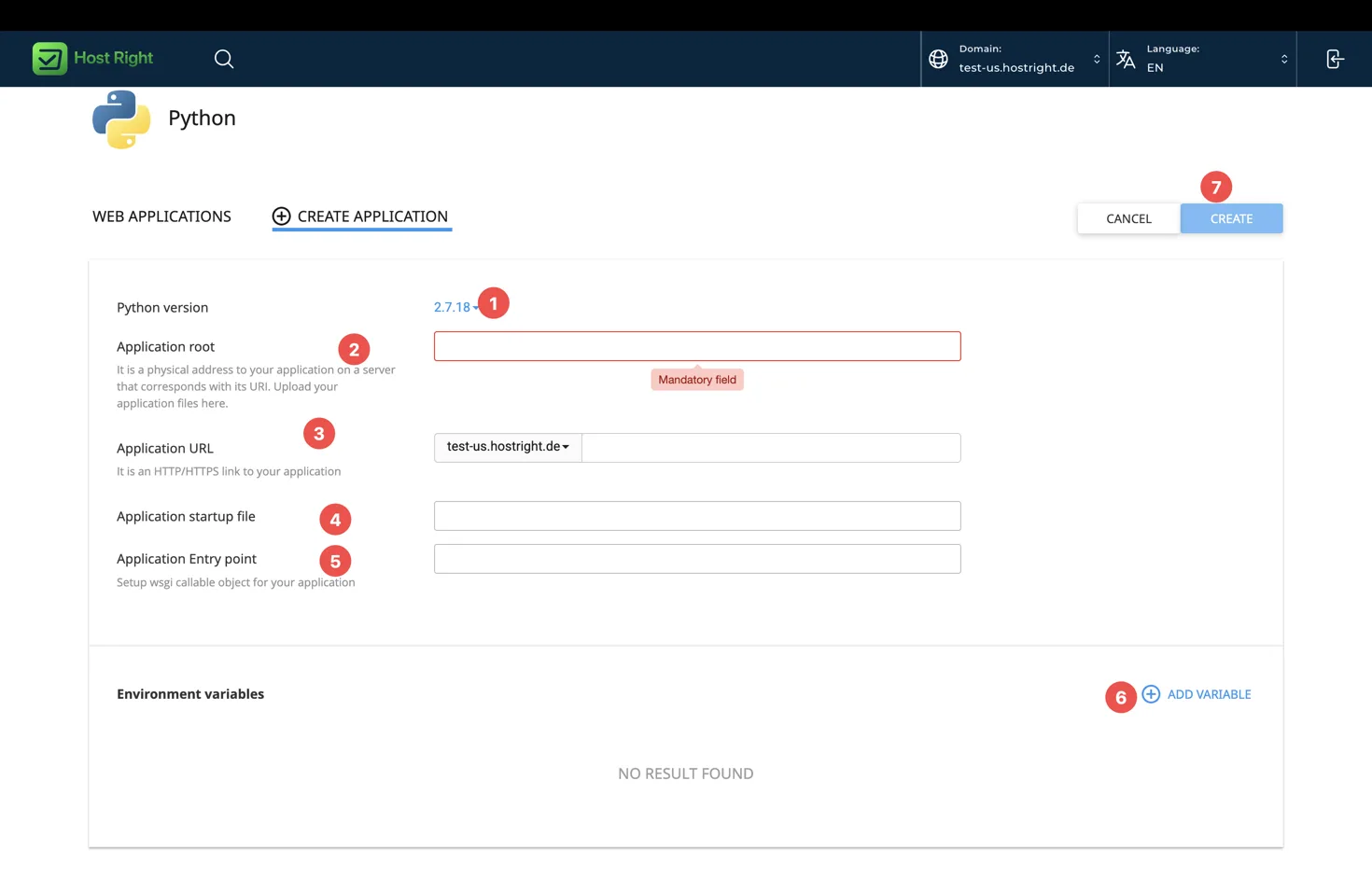
Set:
Application root: apps/example-app
Application startup file: passenger_wsgi.py
Application entry point: application
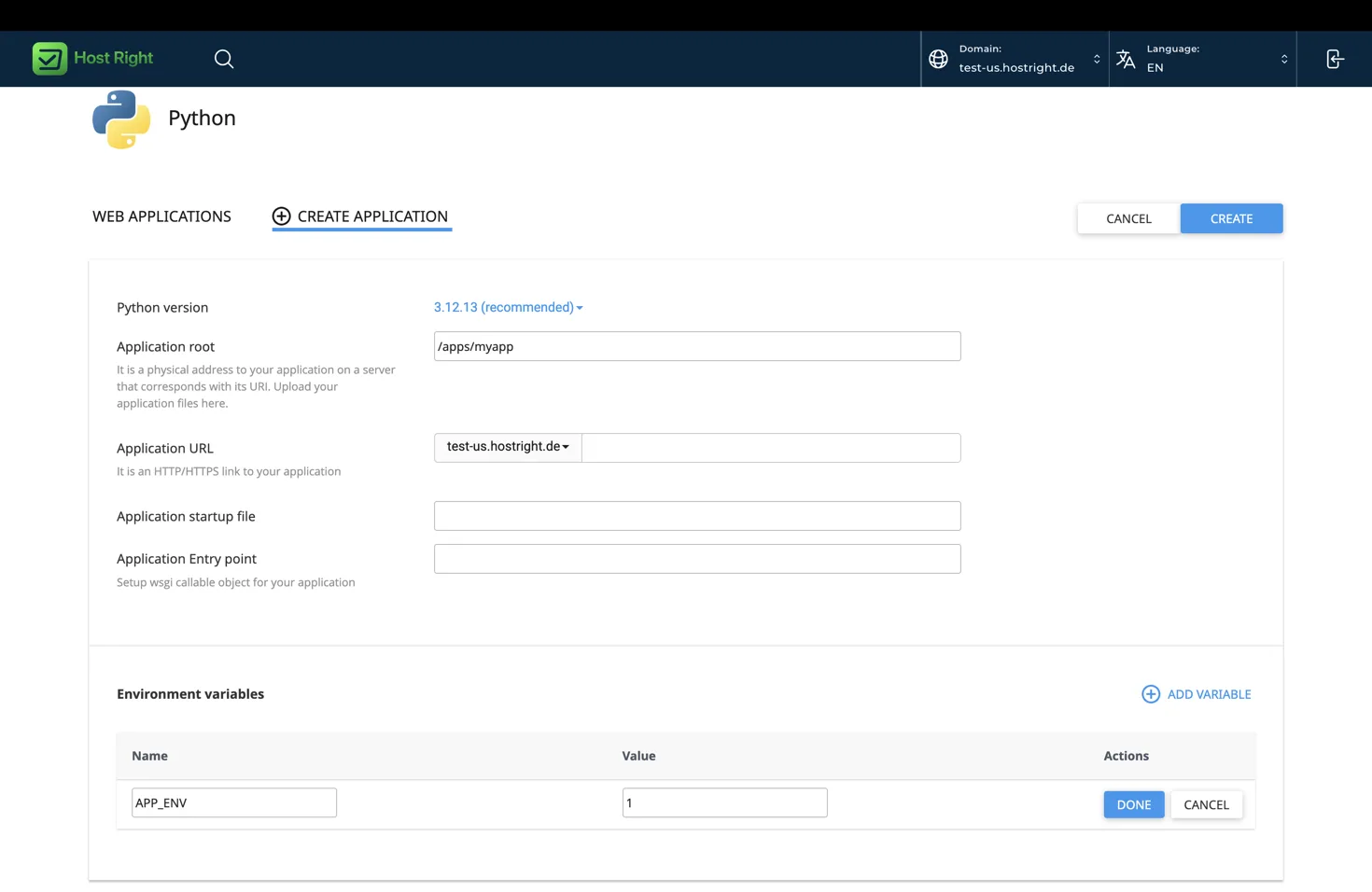
Passenger imports the startup file and looks for the callable named in HostRight Control Panel. A Flask startup file can be:
from app import app as application
A Django startup file can be:
import os
os.environ.setdefault("DJANGO_SETTINGS_MODULE", "project.settings")
from project.wsgi import application
Install dependencies
Use SSH and the environment assigned to the Python application. Replace the example path with the one shown by HostRight Control Panel:
cd ~/apps/example-app
source ~/virtualenvs/example-app/bin/activate
python -m pip install --upgrade pip
python -m pip install -r requirements.txt
python -m pip list
Do not install packages globally. A package in another Python environment will not be visible to Passenger.
A simulated deployment session:
$ cd ~/apps/example-app
$ source ~/virtualenvs/example-app/bin/activate
(example-app) $ python -m pip install -r requirements.txt
(example-app) $ python -c "import passenger_wsgi; print(passenger_wsgi.application)"
<function application at 0x...>
(example-app) $ python --version
Python 3.12.x
Configure environment variables
Use HostRight Control Panel's environment-variable fields:
APP_ENV=production
SECRET_KEY=replace-with-a-long-random-value
DATABASE_URL=replace-with-your-database-connection
REDIS_SOCKET=/path/shown/in/the-control-panel
Read values with os.environ in Python. Never put production passwords, API tokens, or private keys in Git.
Framework setup
Django
Run:
python manage.py check --deploy
python manage.py migrate
python manage.py collectstatic --noinput
Use the Django deployment guide.
Flask
Expose the Flask object as application in passenger_wsgi.py. Do not use flask run in production. Configure the database and secret key through environment variables.
Pyramid
Load the WSGI application from the production configuration:
from pyramid.paster import get_app
application = get_app("production.ini", "main")
Bottle
Expose the Bottle object as application and let Passenger load it. Do not call run() in production.
FastAPI
FastAPI is ASGI, while the standard HostRight Python interface expects WSGI. A WSGI adapter may work for limited use cases, but it can affect async behavior, streaming, WebSockets, and performance. Read the FastAPI and ASGI notes.
Release and reload
cd ~/apps/example-app
git pull --ff-only origin main
source ~/virtualenvs/example-app/bin/activate
python -m pip install -r requirements.txt
# run migrations or framework setup
# reload the application in HostRight Control Panel
Reload Passenger after changing code, dependencies, environment variables, or the startup file. Keep uploads outside the release directory if they must survive a Git checkout.
Test the deployment
curl -I https://example.com
curl -fsS https://example.com/healthz
Check the home page, static assets, login, forms, uploads, database operations, email, and error pages. If the app does not start, check the Python version, application root, startup filename, entry point, package imports, dependency environment, and variables first.
For the complete reference, read Deploy Python applications with HostRight Control Panel and Phusion Passenger.