
Domains
Use Cloudflare SSL and CDN with HostRight
Provision Cloudflare edge and origin certificates, install the origin certificate in HostRight, and safely enable Cloudflare proxying.
Cloudflare can provide the HTTPS connection and CDN between your visitors and HostRight. There are two certificate connections to understand:
- Edge certificate: presented by Cloudflare to visitors. Cloudflare manages this in SSL/TLS → Edge Certificates.
- Origin certificate: presented by HostRight to Cloudflare. You create this in SSL/TLS → Origin Server and install it in HostRight.
You normally do not download the edge certificate and upload it to HostRight. Uploading an Origin CA certificate to HostRight lets Cloudflare validate the encrypted connection to your HostRight origin while Cloudflare continues to provide the edge HTTPS certificate and CDN.
Before you start
- The domain is added in HostRight.
- The domain's authoritative nameservers are active at Cloudflare. If they are managed elsewhere, follow the external domain and nameserver guide first.
- The root and
wwwDNS records resolve to HostRight, or are ready to be created there. - You have access to Account Manager → SSL Certificates in HostRight.
1. Add the website records in Cloudflare
Open Cloudflare → your domain → DNS → Records. Create or confirm the web records copied from HostRight's DNS Management page:
| Name | Type | Target | Proxy status |
|---|---|---|---|
@ |
A |
HostRight's website IP | Proxied after origin SSL is installed |
www |
A or CNAME |
The HostRight web target | Proxied after origin SSL is installed |
Use the exact HostRight target values. Keep MX, SPF, DKIM, DMARC, mail, smtp, pop, and FTP records DNS only. Cloudflare's HTTP proxy/CDN is for web traffic; it does not proxy normal mail or FTP connections.
2. Confirm Cloudflare's edge certificate
Open SSL/TLS → Edge Certificates. Cloudflare provides a universal edge certificate on eligible plans and shows its status and hostnames there. Wait until the certificate is Active for the root domain and the hostname variants you use, such as www and a wildcard.
If you need a dedicated certificate or custom hostname coverage, use Cloudflare's advanced certificate options for your plan. This edge certificate remains at Cloudflare; it is not the certificate you paste into HostRight.
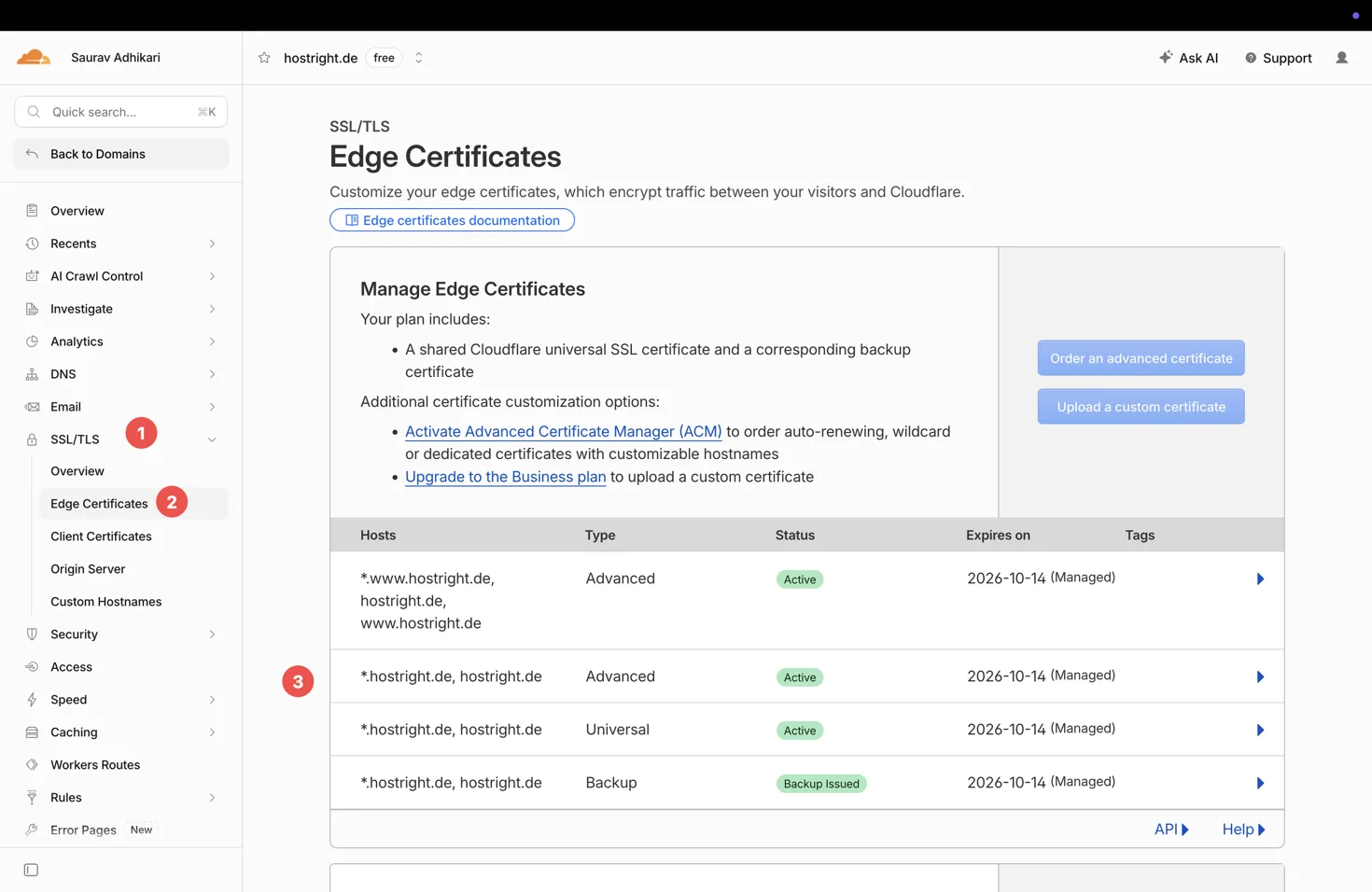
Cloudflare's edge certificate is presented to visitors and remains managed by Cloudflare.
3. Create a Cloudflare Origin Certificate
- In Cloudflare, open SSL/TLS → Origin Server.
- Select Create Certificate.
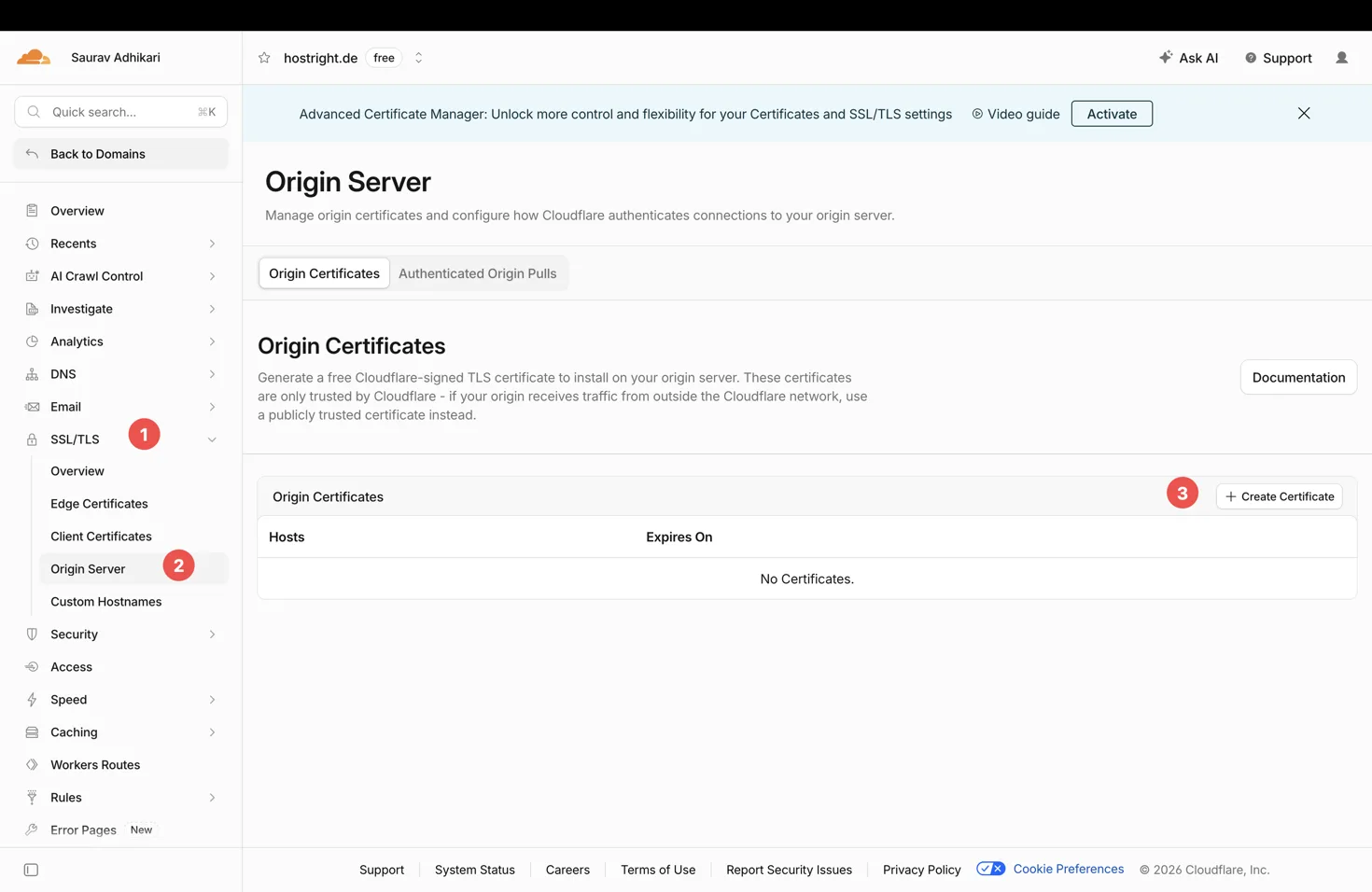
Open Origin Server and choose Create Certificate.
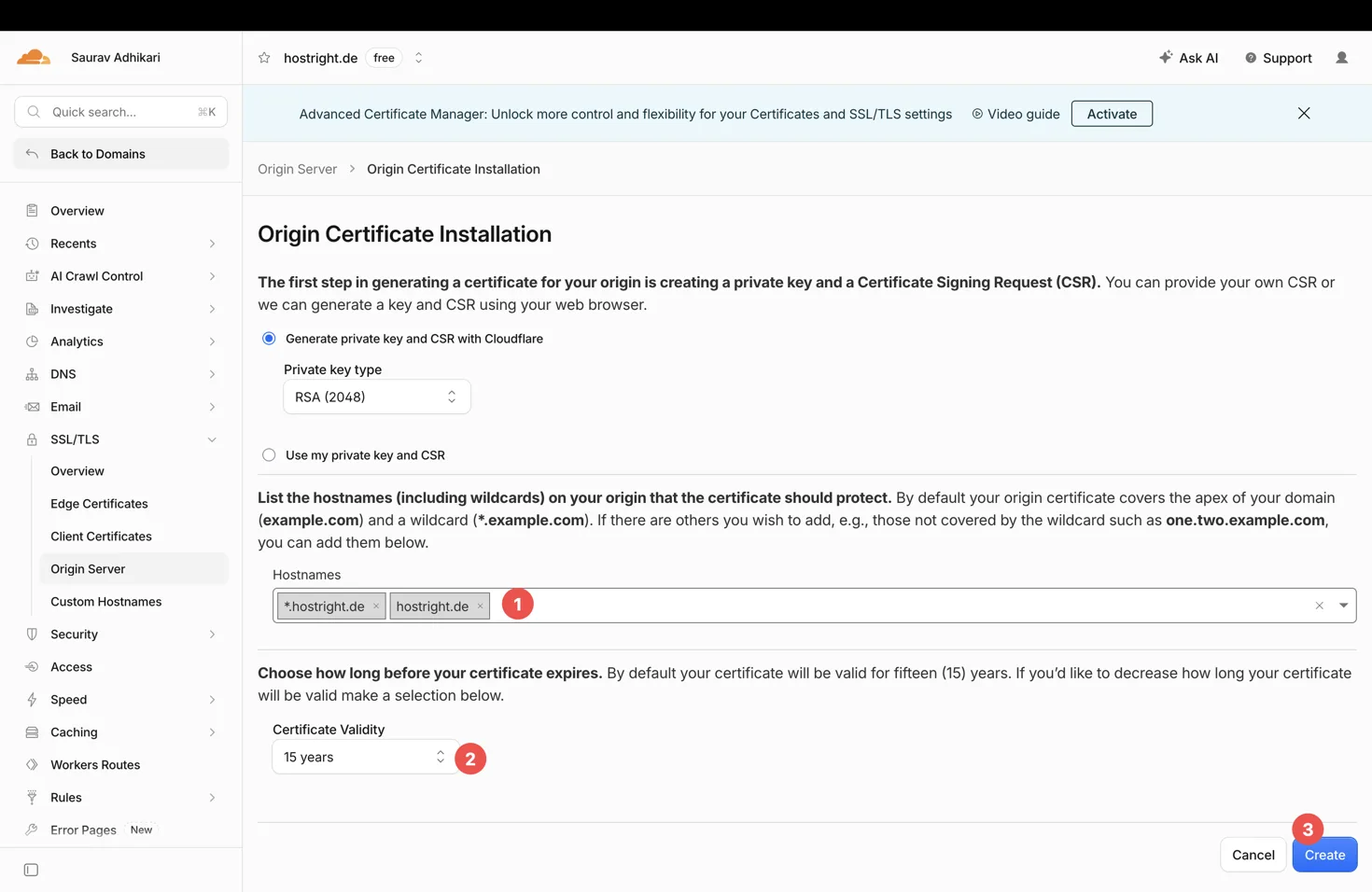
Generate a private key and CSR with Cloudflare, then add the HostRight domain and wildcard hostnames.
3. Let Cloudflare generate the private key and CSR, unless you already have a CSR workflow.
4. Include every hostname HostRight must serve, for example example.com, *.example.com, and www.example.com. A wildcard does not replace the apex domain, so include both where needed.
5. Choose the key format supported by the HostRight form, normally PEM.
6. Create the certificate and immediately copy the Origin Certificate and Private Key into separate secure files. Cloudflare does not show the private key again after you leave the page.
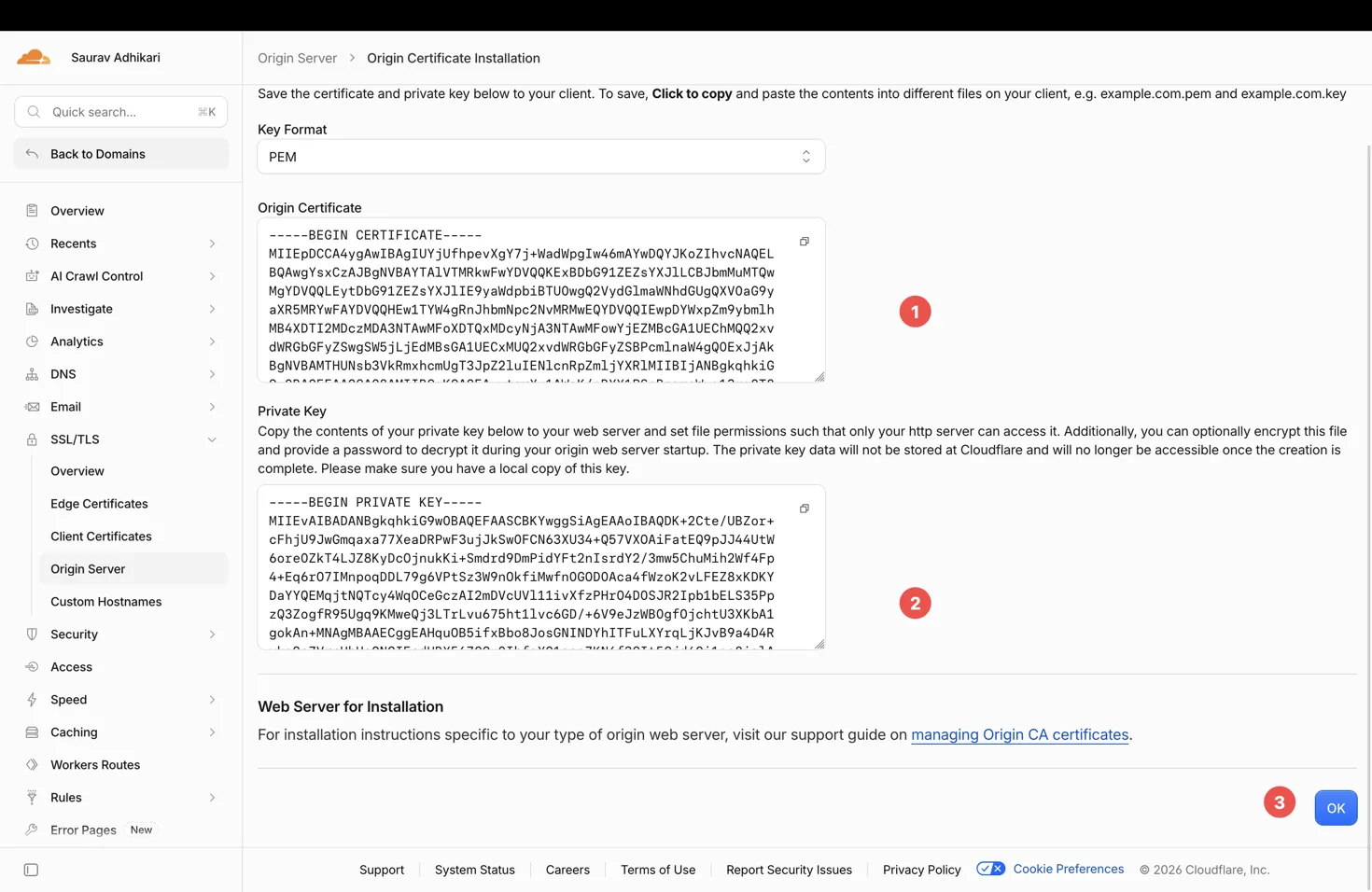
Copy both PEM values before selecting OK.
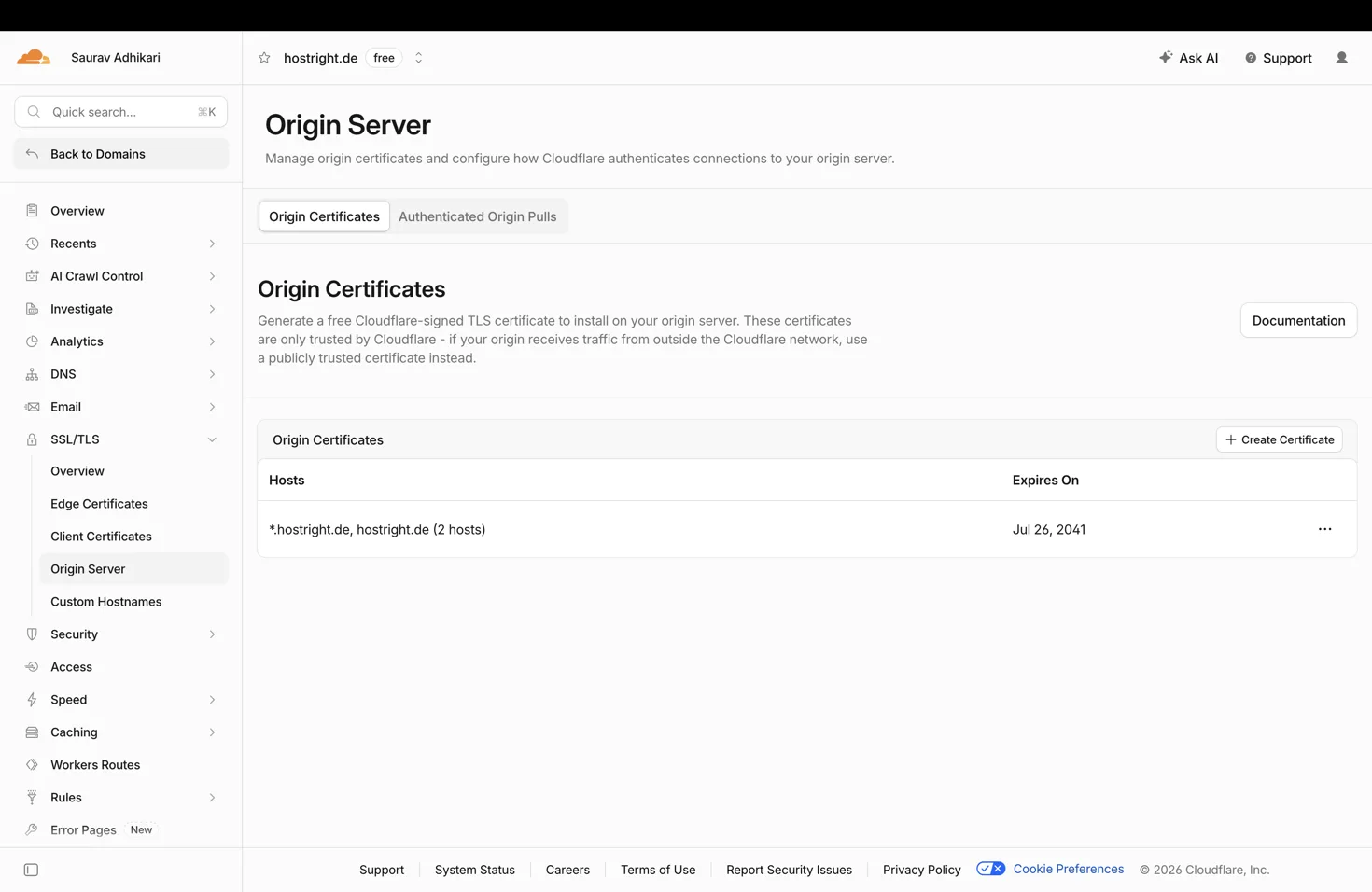
The issued certificate appears in the Origin Certificates list.
Keep the private key secret. Anyone who obtains it can impersonate the origin.
4. Install the origin certificate in HostRight
In HostRight, open Account Manager → SSL Certificates, find the domain, open its action menu, and choose Replace. The page is shown in the certificate actions screenshot.

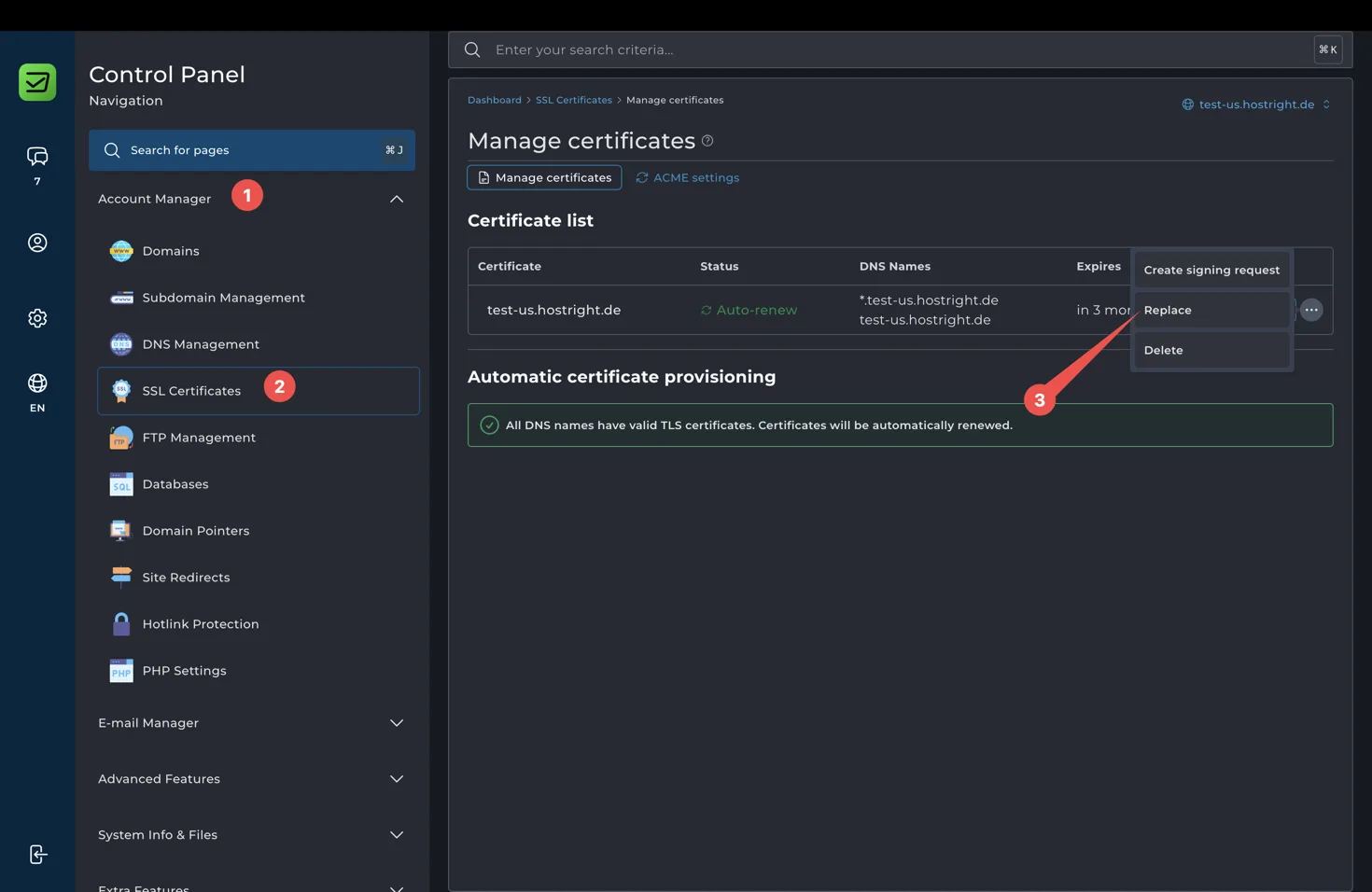
Open the certificate action menu and choose Replace.
- Paste the Cloudflare Private Key into Private Key.
- Paste the Cloudflare Origin Certificate into Certificates. Keep the
BEGIN CERTIFICATEandEND CERTIFICATElines. - If HostRight asks for a certificate chain, paste the Cloudflare Origin CA chain/root certificate after the origin certificate, as separate PEM certificate blocks. Do not paste the private key into the chain field.
- Leave Allow invalid certificate unchecked. A Cloudflare Origin CA certificate is intended for the Cloudflare-to-origin connection; it is not a reason to bypass certificate validation in HostRight.
- Keep the ACME skip-list option enabled only if you want this manually uploaded certificate to prevent HostRight's automatic ACME replacement for the domain.
- Select Replace. The button stays disabled until the required key, certificate, and chain fields contain valid PEM content.
Use the private-key form screenshot and certificate form screenshot as a visual reference. The private key must match the origin certificate.


5. Set Cloudflare to Full (strict)
After HostRight serves the origin certificate on HTTPS, open SSL/TLS → Overview in Cloudflare and set the encryption mode to Full (strict).
Full (strict) encrypts both connections:
Visitor → Cloudflare edge → HostRight origin
The origin certificate must be unexpired, issued by a public certificate authority or Cloudflare Origin CA, and contain a matching hostname in its CN or SAN. HostRight must accept HTTPS connections on port 443.
6. Enable the CDN proxy
Return to DNS → Records and switch the root and web hostname records to Proxied (the orange cloud). Requests for those hostnames now go through Cloudflare's edge network before reaching HostRight, enabling Cloudflare's CDN, caching controls, and security features.
Do not proxy mail or FTP records. Keep the email records from HostRight unchanged and DNS only, including MX, SPF, DKIM, DMARC, mail, smtp, and pop.
Verify the final setup
- Cloudflare → SSL/TLS → Edge Certificates shows an active edge certificate.
- Cloudflare → SSL/TLS → Overview is set to Full (strict).
- HostRight SSL Certificates shows the uploaded certificate and the expected hostnames.
https://example.comandhttps://www.example.comload successfully.- The browser certificate is issued to the visitor-facing hostname by Cloudflare, while the origin connection is protected by the Cloudflare Origin CA certificate.
- Email delivery and DKIM still pass after the web records become proxied.
Common errors
- Error 526: Cloudflare cannot validate HostRight's origin certificate. Check the hostname coverage, expiry, certificate chain, port
443, and that the private key matches the certificate. - Cloudflare works but the site redirects in a loop: check that the application is not forcing an incompatible HTTP redirect and that Cloudflare is set to Full (strict).
- The site is not using the CDN: the web
AorCNAMErecord is probably DNS only, or DNS still points directly to the HostRight IP. Set only the web records to Proxied. - Email stopped working: check that the
MXrecord and all mail hostnames remain DNS only. Never route mail through the web proxy.
For HostRight-managed automatic certificates without Cloudflare proxying, use SSL certificate management.